Now in closed beta

One source of truth for everyone you work with

Millstream is the shared workspace where your team, your clients, and the studios you collaborate with all work from the same projects, files, and conversations. Everyone finally sees the same picture.

Closed beta · No credit card · We'll only email you about your invite

Interactive · try it
Collaborate2 folders
Media 1
Media 2
Media 3
Tickets3 remaining this sprint

Add dark mode toggle

5

Theme switching with system preference detection and localStorage persistence

20/3
LisaLisa

Build checkout flow with Stripe

13

Multi-step checkout with cart review, shipping form, and Stripe payment integration

50/3
JamesJames

Fix nav z-index issue

2

The navigation dropdown renders behind the hero carousel on iOS Safari. Users on mobile can’t access the menu when the carousel is visible.

30/3
MaximMaxim
Fix nav z-index issue
Audit z-index layers across layout
Fix stacking context in nav
Test on iOS Safari + Chrome
0/3
Discussions2 online
James
Pushed the new dashboard, take a look when you can?
Lisa
Love the spacing 👌 one note on the header.
Looks great, ship it 🚀
Social planning3 drafts ready
M7
T8
W9
T10
F11
S12
S13
Week planned ✨
XThu · 9:00

Sneak peek: the client portal we’ve been building 👀

MaximMaxim
Scheduled
LinkedInFri · 11:30

Case study: NovaByte’s rebrand, six weeks start to finish

JamesJames
Scheduled
InstagramSat · 17:00

Reel: a day in the studio, from sketch to ship

LisaLisa
Scheduled
Logging & Reporting
3/3 remaining
Platform Core
User Auth MigrationPlatform Core·Completed Mar 30
Log
TechVault
Stripe Checkout IntegrationTechVault·Completed Mar 31
Log
NovaByte
Dashboard Analytics RevampNovaByte·Completed Apr 1
Log
AI Inbox3 to review
All caught up
New ticketCheckout returns 500 on Safari

“Two customers couldn’t pay this morning.” Flagged as urgent on your call, repro steps attached.

Call · NovaByte kickoff
Dismissed
Time entryLog 2.5h on Stripe integration

You pushed to checkout-flow from 9:14 to 11:46, which matches the NovaByte project.

Today’s activity
Dismissed
CRM updateMove NovaByte to “Proposal sent”

The signed-off proposal went to Sarah yesterday at 16:02, so the deal stage looks stale.

Email · sarah@novabyte.io
Dismissed

One home for the tools that keep your studio turning

CRMProjects & tasksTime & tripsMedia & filesDiscussionsSocial planning

The problem

Everyone's working from a different copy

Briefs sit in email. Feedback is split across DMs and comment threads. Clients ask for updates you've already sent. The freelancer you brought in can't see the latest files. Each tool does its job, but the work keeps moving between people, and the context falls into the gaps.

So work gets done twice, approvals slip, and the team ends up milling around trying to figure out what's current.

Built for collaboration

One source of truth, shared with everyone

Bring the three circles you work with into one place and keep everyone looking at the same thing.

Your team, in sync

Everyone works from the same projects, tasks, files, and discussions. Nobody has to chase the latest version or post the same update in three places.

Clients in the loop

Invite clients to review work, follow the board, and raise requests. They see exactly what you choose to share, and you skip the status emails.

The studios you collaborate with

Work alongside the freelancers and studios you partner with in shared project spaces, without handing over your whole workspace.

What's inside

Every tool your studio touches in a week

Built to work together, so context flows with the work instead of getting lost between apps.

Projects & Kanban

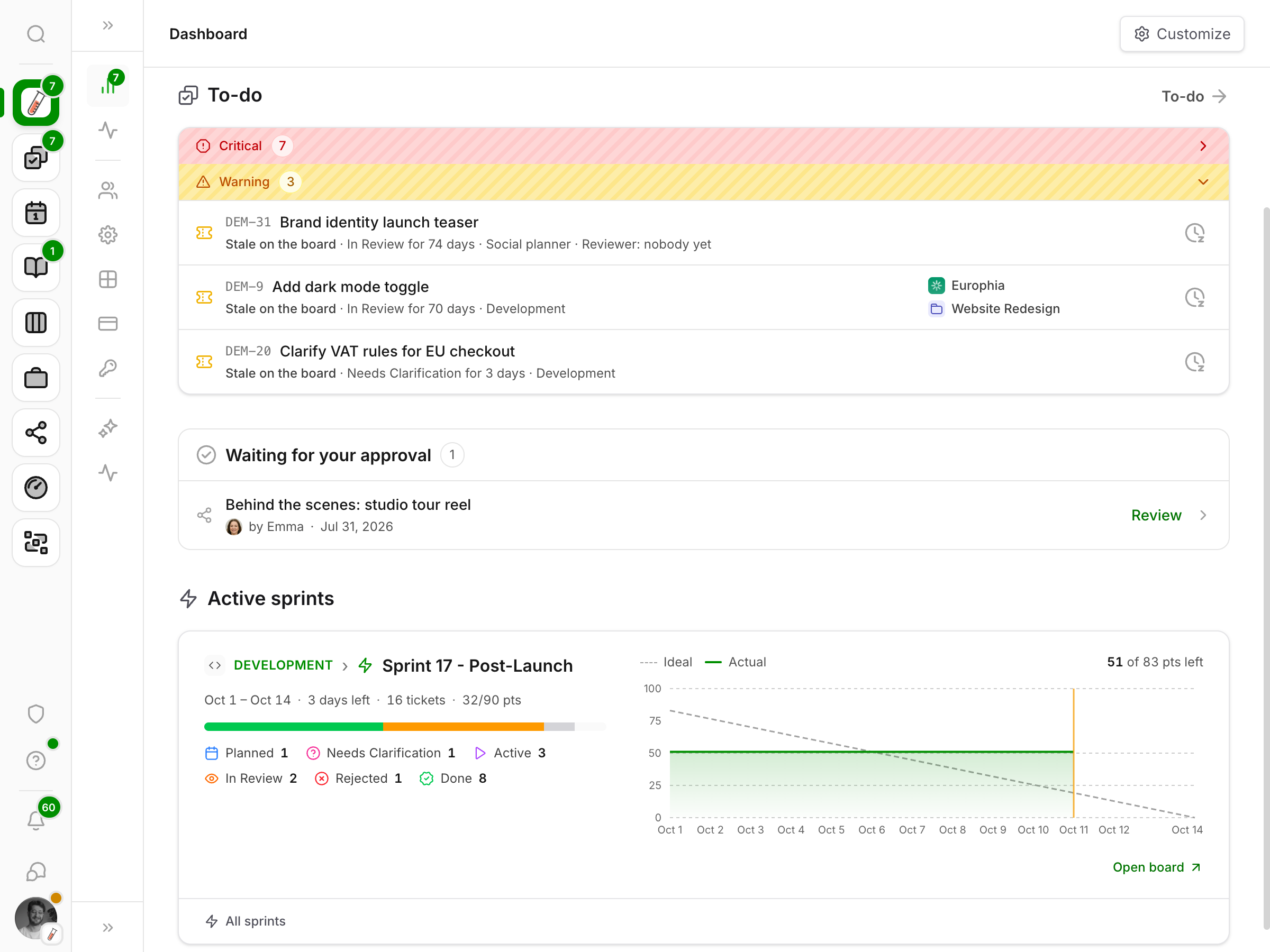
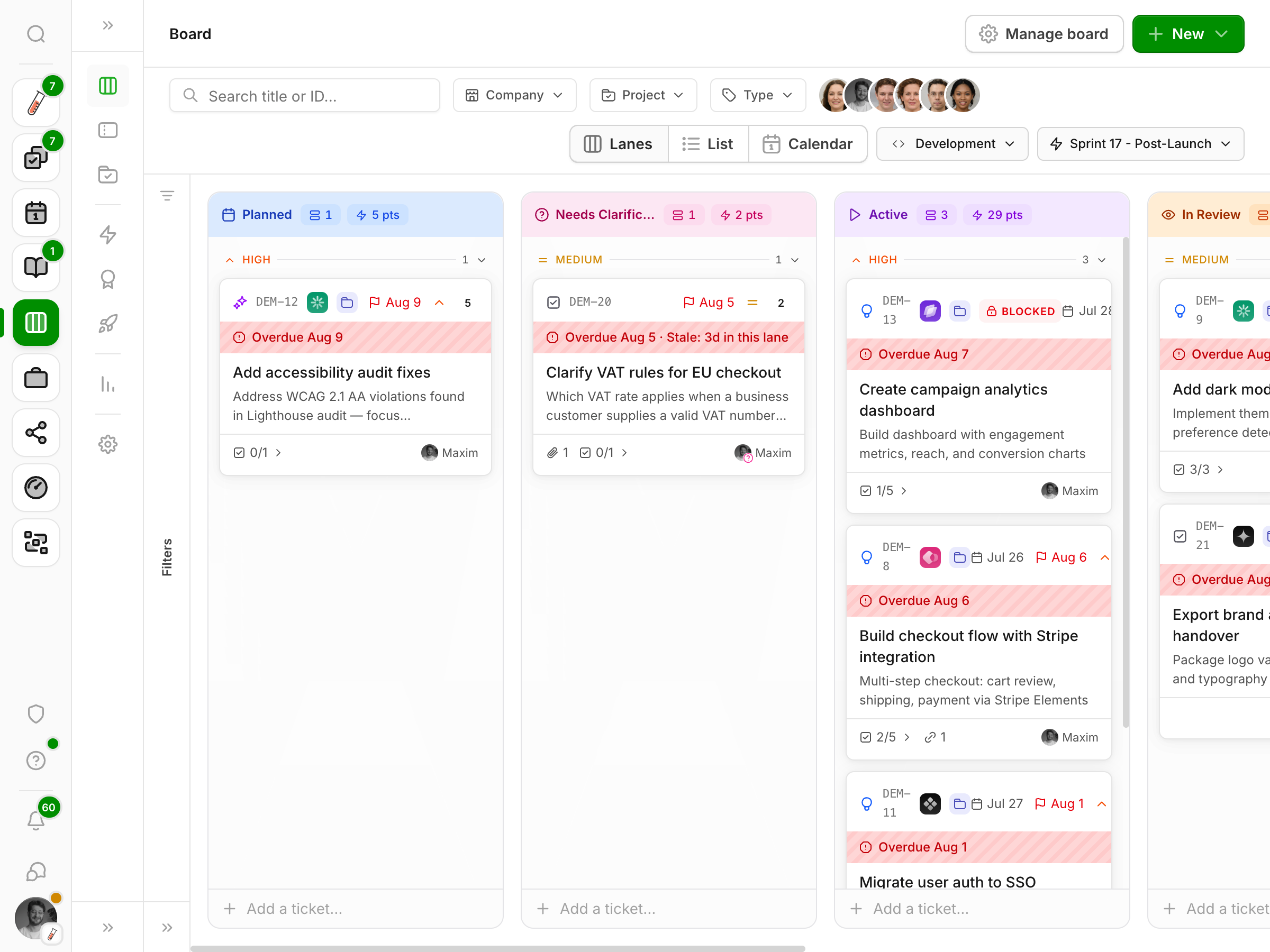
Organize work by client, capture tasks as tickets, and drag them across the board from brief to done.

Time tracking

A timer that lives in the sidebar, with client and project rates so your logged hours turn straight into revenue.

Media review

Upload images, video, and PDFs, then collect feedback as comments right on the asset.

Discussions

Realtime chat on every workspace, project, file, and ticket, with desktop notifications so nothing slips by.

CRM

Companies, contacts, and a timeline of every call, meeting, and email in one place.

Documents

Rich documents that live with the client or project they belong to, not in a drive nobody checks.

Social planning

Draft, approve, and schedule posts across platforms, with assets pulled straight from your media library.

Trips & mileage

Log routes with location autocomplete and per-kilometer rates, so travel time makes it onto the invoice.

Plus a live activity feed, a ⌘K command palette, granular permissions, multi-workspace support, and a dark mode.

Who it's for

Built for studios that juggle clients

If your week is a mix of client work, deadlines, and billable hours, Millstream was made for you.

Creative studios

Design, photo, video, and content studios that run several clients at once and want files, feedback, and hours in one place.

Agencies & teams

Small agencies that want projects, approvals, time, and client access under one roof instead of a pile of subscriptions.

Solo & freelance

Independents who want a professional home for client work, with a private personal workspace alongside it.

How it works

Up and running in an afternoon

You won't need a migration plan or a consultant.

  1. 1

    Request access

    Tell us a bit about your studio. We onboard beta teams in small batches.

  2. 2

    Set up your workspace

    Add your clients and projects, set your rates, and brand it as your own.

  3. 3

    Invite your team, clients & collaborators

    Add teammates with the right permissions, give clients a window into the work, and bring in the studios you partner with.

Why we built it

Made by a studio, for studios

Millstream started as the tool we wished we had. We were running client work across a project board, a time tracker, a shared drive, a CRM spreadsheet, and three chat apps, and we kept losing time in the seams. So we built one place that holds all of it. It's the system we use to run our own studio every day, and we're opening it up to a small group of teams who feel the same pain.

The team at maximized.studio

FAQ

Questions, answered

Everything you might want to know before requesting access.

What exactly is Millstream?

A shared workspace that gives your studio one source of truth for client work. It puts your team, your clients, and the studios you collaborate with in the same place, where projects, a Kanban board, time and trip tracking, media review, notes, a CRM, discussions, and social planning all live together. Everyone works from the same picture instead of a dozen scattered tools.

Who is it for?

Studios, agencies, and service teams that manage client work, from solo freelancers to teams of around fifty. If you bill for your time and juggle multiple clients, it will feel like home.

It's in closed beta. What does that mean?

We onboard a small number of teams at a time so we can support each one properly and shape the product around real use. Request access and we'll reach out as spots open up.

How much does it cost?

Beta access is free while we build alongside our first teams. We'll announce pricing well before anyone is charged.

Can my clients use it too?

Yes. Invite clients as external members to review media, follow the board, and raise requests, while your internal tools, rates, and CRM stay private.

Is my data safe?

Your data is isolated per workspace with database-level access controls, hosted in the EU. You can request deletion at any time.

Which languages are supported?

Millstream is fully available in English and Dutch, and you can switch whenever you like.

Do I need to install anything?

No. Millstream runs in your browser, with a dark mode and a ⌘K command palette to move fast.

Closed beta

Get early access to Millstream

We're letting studios in a steady trickle. Add your details and we'll reach out with an invite.

We'll only use your email to contact you about the beta. No spam, ever.